> For the complete documentation index, see [llms.txt](https://funcui.avaloniaui.net/llms.txt). Markdown versions of documentation pages are available by appending `.md` to page URLs; this page is available as [Markdown](https://funcui.avaloniaui.net/readme.md).
# Getting Started
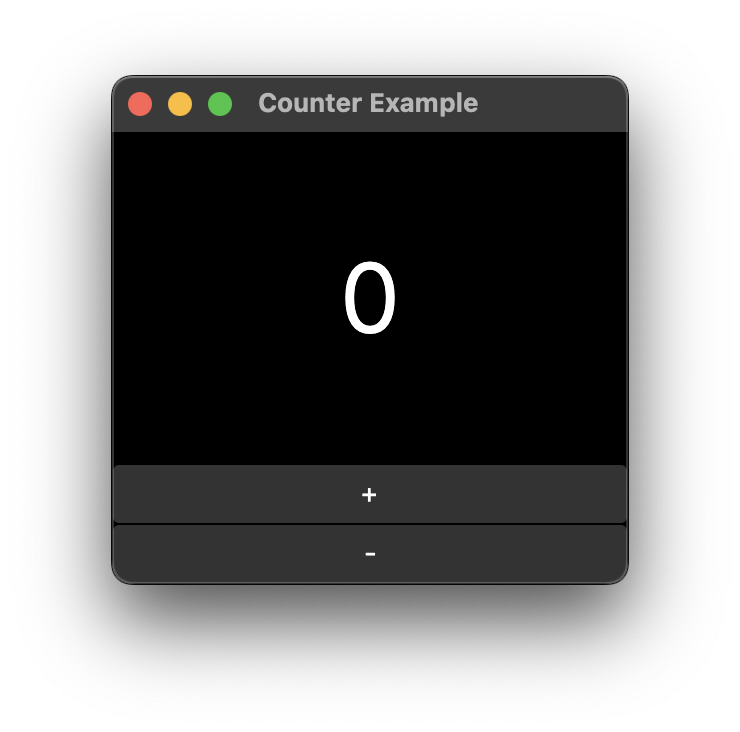
Screenshot of the example app. (Simple counter app with a text block and two buttons)
## Step 1: Empty Console App
Create a new F# console application targeting .net 8 or higher.
## Step 2: Packages
Reference the following packages [Avalonia.Desktop](https://www.nuget.org/packages/Avalonia.Desktop/12.1.0), [Avalonia.Themes.Fluent](https://www.nuget.org/packages/Avalonia.Themes.Fluent/12.1.0) and [Avalonia.FuncUI](https://www.nuget.org/packages/Avalonia.FuncUI/2.0.0).
{% tabs %}
{% tab title="dotnet CLI" %}
Run the following commands in your project directory:
```bash
dotnet add package Avalonia.Desktop --version 12.1.0
dotnet add package Avalonia.Themes.Fluent --version 12.1.0
dotnet add package Avalonia.FuncUI --version 2.0.0
```
{% endtab %}
{% tab title="edit Project file" %}
Paste the following package references to your fsproject file:
```html
```
{% endtab %}
{% endtabs %}
## Step 3: Add code to `Program.fs`
```fsharp
namespace CounterApp
open Avalonia
open Avalonia.Controls.ApplicationLifetimes
open Avalonia.Themes.Fluent
open Avalonia.FuncUI.Hosts
open Avalonia.Controls
open Avalonia.FuncUI
open Avalonia.FuncUI.DSL
open Avalonia.Layout
module Main =
let view () =
Component(fun ctx ->
let state = ctx.useState 0
DockPanel.create [
DockPanel.children [
Button.create [
Button.dock Dock.Bottom
Button.onClick (fun _ -> state.Set(state.Current - 1))
Button.content "-"
Button.horizontalAlignment HorizontalAlignment.Stretch
Button.horizontalContentAlignment HorizontalAlignment.Center
]
Button.create [
Button.dock Dock.Bottom
Button.onClick (fun _ -> state.Set(state.Current + 1))
Button.content "+"
Button.horizontalAlignment HorizontalAlignment.Stretch
Button.horizontalContentAlignment HorizontalAlignment.Center
]
TextBlock.create [
TextBlock.dock Dock.Top
TextBlock.fontSize 48.0
TextBlock.verticalAlignment VerticalAlignment.Center
TextBlock.horizontalAlignment HorizontalAlignment.Center
TextBlock.text (string state.Current)
]
]
]
)
type MainWindow() =
inherit HostWindow()
do
base.Title <- "Counter Example"
base.Content <- Main.view ()
type App() =
inherit Application()
override this.Initialize() =
this.Styles.Add (FluentTheme())
this.RequestedThemeVariant <- Styling.ThemeVariant.Dark
override this.OnFrameworkInitializationCompleted() =
match this.ApplicationLifetime with
| :? IClassicDesktopStyleApplicationLifetime as desktopLifetime ->
desktopLifetime.MainWindow <- MainWindow()
| _ -> ()
module Program =
[]
let main(args: string[]) =
AppBuilder
.Configure()
.UsePlatformDetect()
.UseSkia()
.StartWithClassicDesktopLifetime(args)
```
## Step 4: build and run 🎉
```bash
dotnet run
```